Translations for our friends around the world.

Author Topic: Reentry - An Orbital Simulator  (Read 147381 times)

0 Members and 2 Guests are viewing this topic.

Offline Asid

  • HAVOC
  • *
  • Posts: 27461
Re: Reentry - An Orbital Simulator
« Reply #135 on: September 04, 2025, 12:17:33 AM »
Reentry has been updated to 0.99.82 - Retro planning, Fuel Balance, Improvements
Wed, 3 September 2025


This is a massive update with fixes and improvements learned from my own playthroughs, and corrects bugs reported by players. The list is long, so be sure to check the full patch notes in the bottom.

The main intent of the update is to improve trajectory control in Mercury, Gemini and Apollo. This includes new tools for retrograde burn planning in Mercury and Gemini, and small improvements to the Apollo Maneuver Planner, Trans-Lunar Injection and Trans-Earth Injection tools.

The update also aims to improve the general flow of the game like improved fuel balancing, removal of various dev-flags, game mechanic fixes, and visual/rendering improvements.

Note: If you experience new issues related to this update, please report them. You can revert back the a previous build using the Steam betas tab for the game. Most recent rollback option: Reentry Version 0.99.81


What's new in 0.99.82?


Read on...

funny
0
informative
0
Thanks
0
No reactions
No reactions
No reactions

I stand against Racism, Bigotry and Bullying

Offline Asid

  • HAVOC
  • *
  • Posts: 27461
Re: Reentry - An Orbital Simulator
« Reply #136 on: September 06, 2025, 12:05:01 AM »
Reentry has been patched to 0.99.83 - CM ECS lesson fixes, Retroburn Planner fix
Fri, 5 September 2025


This is mostly a hot fix patch for the Retroburn Planners to properly set the Time to Retrofire timers when clicking the Orange SET button, and a blocking bug in the last mission of the Apollo 13 Historical Mission - a bug that came when I improved the CMC NO ATT logic.

In addition it contains an overhaul of the Command Module ECS lessons, and some minor updates to the Mercury and Gemini Save States.

The patch also implements a color differentiation between the Interaction Highlighter and the Attention Highlighter.

Interaction Highlighter vs. Attention Highlighter:
The Attention Highlighter is used to show where something is, without the need of interacting with it. Previously they had the same color, making it hard to distinguish between the two. This could result in accidental interactions with switches that was simply just highlighted to show you where something is, without having to move it. The Attention Highlighter is now of a lavender color compared to the ice blue color of the Interaction Highlighter.

All of the four CM ECS lessons has been updated to use this Attention Highlighter to better show you where switches, instruments and gauges are.

Patch notes:

  - Hot fix: Mercury and Gemini Retroburn Planner: Fix for the orange SET button to automatically update Time To Retro timers.

  - Hot fix: Apollo 13 (Historical): Fixes to the last Reentry mission to use V40 N20 to remove the NO ATT flag

  - Added Pe and EI nodes on the TEI tools entry trajectory predictor

  - Switch/component attention system: Highlight switch color if lesson only wants to show where something is now has a different color than the one that wants you to move a switch to a different position (interact vs. attention)

  - Added the Attention Highlighter system to Apollo (previously it was only in Mercury and Gemini)

  - Refined the Apollo Command Module ECS: O2 academy lesson

  - Refined the Apollo Command Module ECS: PSC academy lesson

  - Refined the Apollo Command Module ECS: H2O academy lesson

  - Refined the Apollo Command Module ECS: COOLANT academy lesson

  - Refined the Apollo Lunar Module Powered Descent academy lesson

  - Improved Mercury Save State with some additional internal system values

  - Improved Gemini Save State with some additional internal system values

funny
0
informative
0
Thanks
0
No reactions
No reactions
No reactions

I stand against Racism, Bigotry and Bullying

Offline Asid

  • HAVOC
  • *
  • Posts: 27461
Re: Reentry - An Orbital Simulator
« Reply #137 on: September 26, 2025, 12:01:01 AM »
Reentry has been updated to 0.99.85 - Gemini, Academy, game storage fixes
Thu, 25 September 2025


This patch continues to iterate on game content where I have improved the Lunar Module Academy, the Gemini Academy and multiple Campaign missions. It also fixes issues with the games storage system, bugs, and improves the Gemini Virtual Cockpit to better take advantage of its features.


Note: This update touches the games core storage system. If you experience new issues related to this update, please report them. You can revert back the a previous build using the Steam betas tab for the game. Most recent rollback option: Reentry Version 0.99.84.


Game Storage
There has been some reports where users has been unable to launch the game if the games storage file for some reason gets corrupt. This patch tries to improve how the storage system works, and rolls out multiple changes to it. When you launch the game, your existing storage.rsf file will be migrated to the new game.rsf file.

These files are located in the System folder for the game:
%appdata%\..\LocalLow\Wilhelmsen Studios\ReEntry\System

I addition, if the game detects an issue with the game storage file, like it being corrupt, it will re-generate a new file.

Please let me know if you stumble upon any issues related to the migration of the storage files and if this fixes the issue where a corrupt file prevents the game from reaching the Main Menu.


Read on...
funny
0
informative
0
Thanks
0
No reactions
No reactions
No reactions

I stand against Racism, Bigotry and Bullying

Offline Asid

  • HAVOC
  • *
  • Posts: 27461
Re: Reentry - An Orbital Simulator
« Reply #138 on: September 30, 2025, 12:20:11 AM »
Reentry has been patched to 0.99.87 - Gemini Ascent, Academy Exams, Storage
Mon, 29 September 2025


This small update will fix an issue in the Gemini Ascent logic that, for some players only, caused the yaw steering to fail. It also makes some minor improvements to all the in-game Academy exams (aka. Pilot Certification Flights), improves some of the internal logic of the games Storage system, and adds the missing needle to the 3-pointer Altimeter in the Gemini Cockpit.


I also moved the ROADMAP button on the Main Menu a bit up to make it more visible, in case you are curious about it.


Patch Notes:

  - Gemini Ascent Guidance fixes

  - Fixes to the Pilot Certificate Flights (PCFs)

  - Storage System improvements

  - Minor Gemini panel fixes (Altimeter)

  - Roadmap placement on the Main Menu

  - Fixed a potentially blocking issue related to the Lunar Landing from Launch Pad without using a Save State
funny
0
informative
0
Thanks
0
No reactions
No reactions
No reactions

I stand against Racism, Bigotry and Bullying

Offline Asid

  • HAVOC
  • *
  • Posts: 27461
Re: Reentry - An Orbital Simulator
« Reply #139 on: October 04, 2025, 12:03:14 AM »
Reentry has been updated to 0.99.88 - Sound Design, Engine Plume test. bug fixes
Fri, 3 October 2025


This updates rolls out a Sound Design overhaul containing some dynamic cockpit sound effects, and RCS jet sounds, adds a new engine plume test to the CSM SPS, LM DPS and LM APS engines (orbit view only), and fixes some critical bugs.

Note: This update touches the games core storage system. If you experience new issues related to this update, please report them. You can revert back the a previous build using the Steam betas tab for the game. Most recent rollback option: Reentry Version 0.99.87.


Sound Design / Soundscaping

System Components

This update rolls out a system that makes it possible add dynamic sound effects to the Virtual Cockpits. I will start small with the sound design elements, but have added an inverter fan, suit fan and a cockpit fan sound effects to these systems across all programs.


Reaction Control Jets

In addition I have worked on the RCS jet sound design where I have added improved logic to make it possible to hear the ON/OFF clack sound effect of the valves opening for various thrusters, and the flow of gas for combustion. Thanks to Dee-Jay for helping me with the RCS sound effects.


Engine Plumes

I have rolled out a more sophisticated engine plume handler. It is currently in its initial version when it comes to look and feel, transparency settings etc, but rolling this out as a test for the Apollo CSM SPS, LM DPS and LM APS engines initially. If these seem to work I will improve the visuals of them, and extend the system to also support some of the 2nd/3rd ascent stages of Mercury/Gemini/Saturn V/Saturn IB.


Language Issue on Campaign Pages

I have finally tracked down an issue that causes the Campaign Pages to sometimes load the wrong language. For example if you have set the language to English, some users could see the Spanish version of the Campaign pages instead of the English version. This is a rare bug so it was hard to track down.


Checklist Guidance System: Complete a Checklist improvement

I have improved the checklist guidance system (the system that handles the two RUN buttons and the checklist steps that are queued up) to internally tag each step with what checklist they belong to. This can make it detect that you have completed a particular checklist if you have multiple queued up. In the future this can be used to more advanced checklist flow as was suggested during my AMA session. But one step at a time, let us see if this implementation works well and is stable.

Thanks all for reporting issue. I have also detected that some crashes has been reported recently. I am curious if it could be related to Unity 6.1 builds and latest graphics drivers or something, will need to dive a bit further into this as I check out Unity 6.2 and a fix for the lately detected security issue.

Patch Notes:

  - Fixed an issue with the Lunar Module Ascent Lesson

  - Made so it is possible to end P79 in the CSM

  - Gemini Yaw-Steering during ascent guidance fixes

  - VR: Made so you can move the camera with the keyboard

  - Fixed so Superimpose can't be UI navigated (Left, Right, Up, Down)

  - Apollo Command Module Astro/Crew collider check fixes

  - Sound Design updates

  - Fixed an issue where the Language of a Campaign could be set to something else than the selected language (reported Spanish language in one or two campaigns, while English is selected)

  - Improved the checklist guide system to detect if a particular checklist has been completed even if you have enqueued other checklists as well.

  - Engine Plume test for the CSM SPS, LM DPS and LM APS engines

funny
0
informative
0
Thanks
0
No reactions
No reactions
No reactions

I stand against Racism, Bigotry and Bullying

Offline Asid

  • HAVOC
  • *
  • Posts: 27461
Re: Reentry - An Orbital Simulator
« Reply #140 on: October 07, 2025, 12:52:23 AM »
Reentry has been updated to 0.99.89 - Rendering, Bug Fixes
Mon, 6 October 2025


This update improves Mercury autopilot fuel efficiency, updates rendering and lighting systems, adds the new Plume Renderer to Mercury and Gemini, enhances the Mercury cockpit, and resolves reported issues.

Note: If you experience new issues related to this update, please report them. You can revert back the a previous build using the Steam betas tab for the game. Most recent rollback option: Reentry Version 0.99.88.


Mercury ASCS

The Mercury ASCS is responsible for automatic attitude control. I made some improvements to it and fixed an issue where it would typically overshoot in roll, then enter a ping/pong mode until the target has been reached. I corrected the rate limiter issue that caused this to happen, and improved a few other things to reduce fuel consumption.

Tips: It is always recommended to use a manual mode for most of the flight.

https://clan.fastly.steamstatic.com/images//33371327/f7a001abf383c6d1ea50e2dff653d849d46c709c.png


Earth Rendering / Atmosphere shader fixes

I fixed a shader issue in the Earth Atmosphere shader that previously caused a NaN (Not a Number error). This created a small spark in the atmosphere as the faulty pixel was overbright and triggered the bloom system (many believed this was lightning strikes or other phenomenon. It became a little thing). For you who wondered what this actually was, now you have the answer.

As this is fixed I was finally able to re-enable the games blooming logic as part of the post processing effects.

This can make it possible to further down the line make an option to toggle off the Lens Flare, and instead render a bloomed sun. I will at a later update make it possible to toggle off the Bloom Effect in the post processing layer.

In addition, I made some improvements to the Earth and Cloud brightness settings and coloring to try and reduce the brightness of Earth, and the occasional but rather blinding areas where if over a desert with clouds below you, could be quite annoying. I will continue to iterate but I hope this reduces the issue.

Astronaut/Crew Hider

The astronaut hider responsible to hide the astronaut if your camera is near or inside its head had an issue that I though was corrected in the previous update. It was not, and I rewrote the logic. It should now work as intended.


New Launch Vehicle Plumes for Mercury and Gemini

I am continuing my pursuit of improving the plumes in the Mercury and Gemini ascent. These are quite simple but will adjust itself as the rocket climbs. You can see that the plume isn't static. Its size and shape is dynamic and will look different at lower altitudes compared to higher altitudes.


P01 Timescale block

Players trying to time scale through the P01 alignment in the Apollo Command Module before liftoff might have noticed that it can cause the alignment to fail. I have made a quick check to disable time scaling during P01 alignment.


Mercury Cockpit Improvements and Rendering

As I was fixing some issues with rendering and lighting conditions in the cockpits, along with re-enabling bloom, and decided to take a few hours to improve some of the elements inside the Mercury cockpit. This is the oldest craft, but the first step for most new players. When you enter the cockpit you will see new and improved cockpit indicator lights, fixes to a few gauges, updates to the Earth Path Indicator (EPI) model, and general fixes to various interactable components. I have also fixed an issue with the SSAO layer that could cause barely visible dark lines (artifacts).


Dynamic Cabin Audio

I continued to iterate on cabin audio in Project Mercury. I replaced the cabin depressurize and repressurize placeholder sound effects with new ones, and improved their logic. I also worked on the EPI and added its ticking noise. This is a test of the 3D cockpit sound effect.


Unity Security Update

A Unity security patch has been applied to the games executable to accommodate a security issue in the Unity Game Engine.


End-of-Early-Access Price Adjustment

As the game prepares to leave Early Access and launch version 1.0, the price is adjusted as mentioned in the Early Access interview on the games Steam Store page.

To accommodate Steam schedules, sale cooldowns and release logistics in November 2025, the price will be increased as soon as Steam publishes the new prices. The price of 34.99 USD is the final price for 1.0.

The journey doesn?t stop at 1.0 - it?s just the start of the next chapter. You can hear about the journey and the 1.0 release here, followed by the recording of my Ask-Me-Anything (AMA) I held October 1st.


The Ask-Me-Anything:
https://www.youtube.com/live/MvVKT1y_CUM


Patch notes:

  - Fixed the Earth Rendering sun reflection blob on the oceans

  - Fixed the root cause of the Atmospheric Flashes issue, it was caused by a Nan in two of the atmosphere shaders.

  - Astronaut Hider fixes

  - Improved Mercury Redstone Launch vehicle plume

  - Improved Mercury Atlas Launch vehicle plumes

  - Improved Gemini Titan Launch vehicle plumes

  - P01 timescale block

  - Mercury ASCS roll overshooting issue

  - Minor changes to CM lesson 9, Earth Entry

  - Fixed an issue with the RCS Rate Command logic in both Mercury and Gemini

  - Small updates to the Mercury EPI

  - Small updates to the Mercury Cockpit light indicators

  - Fixes and improvements to the Graphics Rendering logic

  - Fixes to the Earth brightness and tone

  - Fixes to the Clouds renderer, and re-coloring

  - Unity Security Patch

Update: Another build was released due to some meta changes, version is still the same.

funny
0
informative
0
Thanks
0
No reactions
No reactions
No reactions

I stand against Racism, Bigotry and Bullying

Offline Asid

  • HAVOC
  • *
  • Posts: 27461
Re: Reentry - An Orbital Simulator
« Reply #141 on: October 22, 2025, 11:35:17 PM »
Reentry has been updated to 0.99.90 - Entry Guidance, Gemini Docking, Missions
Tue, 21 October 2025


This update mainly focuses on bug fixes, polish and mission improvements. Please see that patch notes below for the full list.

Note: If you experience new issues related to this update, please report them. You can revert back the a previous build using the Steam betas tab for the game. Most recent rollback option: Reentry Version 0.99.89.

Entry Guidance for the Apollo Command Module
I have fixed some key issues with the Apollo Entry Guidance logic. The intent of the entry guidance is initially to get you through the atmosphere and survive the entry. Once I get this as stable as possible to reach that goal, I can start to improve the guidance to better guide you towards the actual landing zone.

In addition, if an issue with my Entry Guidance logic causes an abnormal entry, I will bypass the MAX G-LOAD limit to avoid destroying missions that are supposed to work. If you are an advanced player, I still recommend you to learn how to identify this, take manual control, and steer the craft manually.

I also recommend all players to learn how to perform manual entries, it is a lot of fun, and a good skill to have in this game.

Note: You can always toggle the "structural G-load limit" setting completely off to become indestructible during entries. This is typically a good setting to use during training.


Image credit: NASA


Mercury Mission 5 (Hawaii)
The last mission of the Mercury Campaign has received a little overhaul with some improved guidance and a few other things to improve the flow. I can't tell too much to avoid spoilers.


Mercury EPS and Lights Test
I fixed some issues with the Electrical System and the Warning Light system of the Mercury capsule. This improves the light test slightly and corrects the issue where RETRO RESET would not extinguish after the test (getting stuck). It also fixes an issue where some lightbulbs could illuminate even if the power is removed.


Mercury Entry SFX I made some improvements to the Mercury entry SFX to become more realistic. It now uses a similar logic to what Gemini and Apollo Command Module uses. This removes the old annoying entry SFX. I think I will miss it, slightly.


Gemini Docking
This patch improves Gemini docking. I finally managed to find a solution to the Gemini docking interpolation that allows me to be a bit more creative. You will now head a grinding noise as the nose enters the cone (during interpolation), and a sound effect plays from the docking latches as they close. If this seem to work (unlike my previous attempt that I had to roll back a few months ago), I can use this to improve actual collision between Gemini and Agena. This system could potentially carry over the Apollo as well.


Image credit: NASA


Mission System Updates and Typos
Thanks for reporting issues related to missions, and typos in them. This patch rolls out quite a few fixes to various missions, the mission system itself and corrects reported typos.


Patch notes:

  - Mercury: Campaign Mission 5 (Hawaii) updates

  - Mercury: Retro Reset light didn't extinguish after light test

  - Mercury: EPS DC check fix (cabin light could illuminate without power)

  - Fixed a bug in Mercury UDP API that triggered the function but did not refresh the cockpit transforms

  - Minor improvements to the Apollo Command Module panel models

  - Fixed the Mercury entry SFX to be similar to Gemini and Command Module

  - Gemini: Improved Docking interpolation

  - Gemini: Added docking cone metal noise SFX

  - Gemini: Added docking latches SFX

  - Mercury/Gemini test: Slight volume mixing of the RCS thrusters

  - Apollo CMC Entry Guidance fixes

  - Gemini Academy lesson 10 (burns) renamed to lesson 9

  - Gemini Career tree node fixes

  - Fixed: Camera moves when attempting to slew things like the optics or the LM radar

  - Improved gauge sun glare shading

  - Typo/spelling fixes

  - Fixed an issue that caused the avatar in the character editor to become invisible after the previous patch

  - Fixes to target orbit in Campaign 3, Mission 4

  - Fixes to target orbit in Campaign 4, Mission 3

  - Fixed an issue that made the Avatar in the Character Editor invisible (an issue introduced in the previous patch)

funny
0
informative
0
Thanks
0
No reactions
No reactions
No reactions

I stand against Racism, Bigotry and Bullying

Offline Asid

  • HAVOC
  • *
  • Posts: 27461
Re: Reentry - An Orbital Simulator
« Reply #142 on: November 07, 2025, 11:16:22 PM »
Liftoff - REENTRY hits 1.0 and has left Early Access!
Fri, 7 November 2025


After 10 years of development, Reentry - A Space Flight Simulator is finally out from Early Access!

What a journey it has been. After 7 years of Early Access where I have been in active development with you, the players, the community, and the test pilots, the 1.0 scope has finally been met where the goal was to implement the mandatory systems to allow you to:

  - Reach Orbit in Project Mercury

  - Rendezvous and Dock in Project Gemini

  - Land on the Moon in Project Apollo

The game has slowly evolved to become something much bigger than I ever imagined possible for a single developer. However, I have never felt alone. From the start, you, the community, has joined me along the journey to help me shape the game, support me and been part of the project in one way or another. For that I thank you!

This will be celebrated with the community through a fully online event, and I will be hosting multiple development updates, Ask-Me-Anything's (AMA) and Steam Broadcasts.


THANK YOU!

I want to take this moment to thank you for being part of the game in one way or another, either you reporting issues, sending suggestions, providing constructive feedback, being part of the community, helping out other players, organizing multiplayer sessions, being a moderator, or being a Test Pilot, your work is visible in the game, and can be enjoyed by everyone else. So thank you again!


RNTYCON 2025 - The 1.0 Online Release Party


For the release and to celebrate 10 years of REENTRY, the he Reentry 1.0 launch party will be all online, so you, the community, can participate and join me in celebrating the release of the game.

The event also adds a new game mode, the Flight Plan Mode, for Project Apollo.

The sessions will get their links added behind them after the first session (see agenda below) is done, so step back here for details as I update the post with links to each session.


Friday Agenda

1.0 bits are published - NOW

Steam Launch Trailer, YouTube - NOW

10:00 AM (Pacific Time): RNTYCON 2025 Launch Party Keynote:


YouTube? Video: The Reentry 1.0 Launch Party - Ask-Me-Anything (AMA)
https://www.youtube.com/live/rIPnUxpv5mI

11:30 AM: The Developer Plays the Apollo 8 launch using the new Flight Plan Mode, Steam Broadcast

MOCR LIVE, in-game event, see the Apollo Live Mission here:
https://www.youtube.com/live/x4kDY-b7UsI


Saturday Agenda

10:00 AM (Pacific Time) An overview of the Reentry Community and how to navigate it, YouTube

10:30 AM The Future of Reentry, YouTube

11:00 AM Ask-Me-Anything, YouTube

12:00 The Developer Plays, Steam

Most sessions will be recorded and stored under the RNTYCON 2025 - The 1.0 Release Party YouTube Playlist.


funny
0
informative
0
Thanks
0
No reactions
No reactions
No reactions

I stand against Racism, Bigotry and Bullying

Offline Asid

  • HAVOC
  • *
  • Posts: 27461
Re: Reentry - An Orbital Simulator
« Reply #143 on: November 22, 2025, 12:01:25 AM »
Reentry has been updated to 1.0.12 - Landing Time Scale, Gemini EVA, Save States
Fri, 21 November 2025


This patch continues my work on correcting reported issues on the 1.0 features, while also improving some of the existing systems to support time scale during landing, improve lessons and missions, improve Save States, and improve the Gemini EVA. See the patch notes in the bottom for a full list.

Note: If this patch causes new issues for you, please report them. You can always revert back to a previous version using the Steam Betas tab for the game. The latest previous version is: 1.0.8.


Timescale during Landing/Splashdown

One key feature this patch contains is the first support for time scaling during landing. Time scaling is generally a very hard problem to work with and support. Systems usually need some recovery-logic when they "return from their time travel", and figuring this out can be very hard. One of the key areas yet to support time scale is during landing. Unlike ascent, you do not have much to do other than completing some minor checks and waiting for splashdown.

I am happy to now roll out the initial support for time scale during landing. You can use the keyboard buttons [1] -> [4] to set the time scale to the same amount as what they key is, so [4] is [4x]. The maximum time scale I support in this first iteration is 4x, but this is something I can work to improve once I know the current implementation is stable.

In addition, I have made some improvements where some players who have very high fps could experience a slower descent, making the waiting time during landing longer than normal. I made some corrections to the logic to prevent this from happening.


Credit: Martha Gooch


Gemini EVA

I have improved some of the main elements related to Gemini EVA. First of all, I improved the reaction system to better account for weight and solved an issue where the weight of the Gemini craft was too light, making it spin when colliding with it.

The attitude control sensitivity of the astronaut during EVA is also improved and should now give you much finer control during attitude maneuvering.

I also added a breathing sound effect as requested during Gemini EVA as a test.


Save State improvements

I have been working on some of the core save state logic to solve some issues reported related to the mission progress when saving/loading save states. The state would insert you in the orbit you had when saving the state, but mission progress would for some users not continue from where it was when the state was saved. Going forward I will keep iterating on the Save States to also support burn plans and computer states.

Note: If a step of a mission blocks you from proceeding you can use the DENY button on the Message or on the Current Objective to automatically complete the current step and proceed with the mission.


Mercury Cage logic

I made a fix for the Mercury gyro cage logic. In Mercury, the gyros are slaved to the horizon scanners, where they try to maintain a local vertical orientation, meaning the horizon is your zero attitude. You can decouple the gyros from the horizon scanners by setting the gyros to free. This will make the gyros stay fixed relative to the stars instead. You can then re-align the gyros to any attitude by caging the gyros.

An issue made so the platforms x-axis got inverted during gyro cage. It was not easy to notice as the outcome was that your pitch attitude needle would move up instead of down in pitch, something that also can feel natural without knowing.


I also fixed an issue that caused the Horizon Scanners to stop driving the platform after separating the retrograde engines.


Perform star marking in the SXT

In the Apollo Command Module you use stars during navigation, and need to center a target on them to perform marks. These marks must be very precise. To get the needed precision, you use the SXT as it has a very narrow field of view. However, the mission and logic would allow you to perform marks using the SCT instead, but this mark would not get captured and no error was given. In this patch I make it required to perform the MARK through the SXT, and adds a note about this in the checklist and the optics lesson.


Language support

This patch rolls out contributions and fixes to both the Russian and French language support. All of these contributions are made by other players in the community so a big thank you for those who has contributed.

Note: The Discord has international channels for both French and Russian speaking players.

Thanks to all who has helped me with feedback, bug reports and suggestions.


Patch notes:

  - Fixed an issue where the Mercury Horizon Scanners would stop slaving the platform after retrofire.

  - Ultimate Reflection probe tuning

  - Updates to mission texts, typos

  - Pulled in latest language support contributions (FR, RU) - thanks to all contributors!

  - Fixed and balanced the Gemini/Astronaut weight during EVA

  - Improved the physics forces of landing chutes to attempt make them equal across various hardware and fps

  - Added support for time scaling (up to 4x) during landing

  - Animated the Landing Attitude transition in Gemini

  - Attached the Gemini panel lights to the hatch models

  - Fixed an issue where Gemini cabin pressure would some additional time to load during missions starting in orbit

  - Mercury Gyro Cage inverted up-axis fix

  - Save State Improvements for all programs

  - Time Scale resetting to 1 when receiving a message while timescale is 0.5 (slow) - it should keep the slow mode

  - Made so it is required to be in the SXT to press the MARK button

  - Made timescale multipliers consistent between all programs

  - Make it clear that in CM lesson 10 the orb rate is normal but it will stabilize when sep.

  - Jukebox will reset position and orientation on toggle

  - Added a breathing SFX for Gemini EVA

  - Fixed Saturn V exhibition footstep SFX

  - Gemini Altimeter model improvements

funny
0
informative
0
Thanks
0
No reactions
No reactions
No reactions

I stand against Racism, Bigotry and Bullying

Offline Asid

  • HAVOC
  • *
  • Posts: 27461
Re: Reentry - An Orbital Simulator
« Reply #144 on: January 06, 2026, 12:14:42 AM »
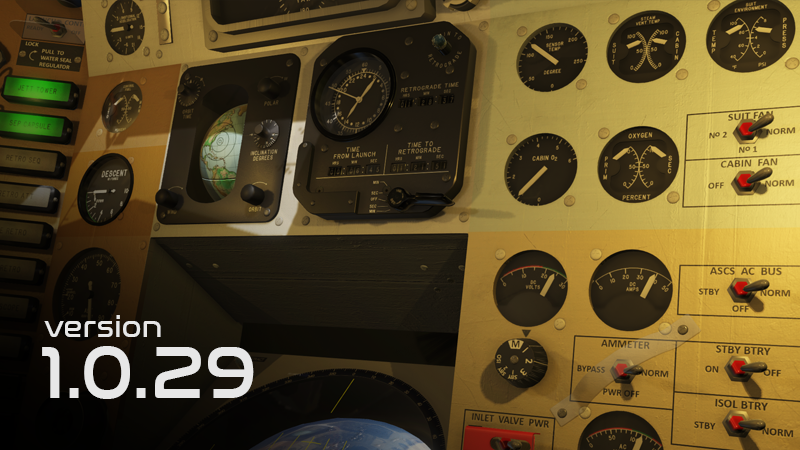
Reentry has been updated to 1.0.29 - Bug fixes
Mon, 5 January 2026


This update continues to iterate on core gameplay bug fixes and features designed to improve game play. Quite a lot of fixes has been applied and is covered in the bottom of this post, so be sure to scroll down and check it out. I have highlighted some of the bigger changes below.

Note: This patches contains quite a lot of internal changes in addition to the feature list as I am preparing the solution for some new things yet to be announced. If this patch causes new issues for you, please report them. You can always revert back to a previous version using the Steam Betas tab for the game. The latest previous version is: 1.0.21.


Additional Mission Pad Drag Zones

Moving the Mission Pad around on the screen can be a bit hard as some pages contains many interactive elements. To supplement the existing system I have added specific drag zones on each side of the Mission Pad.
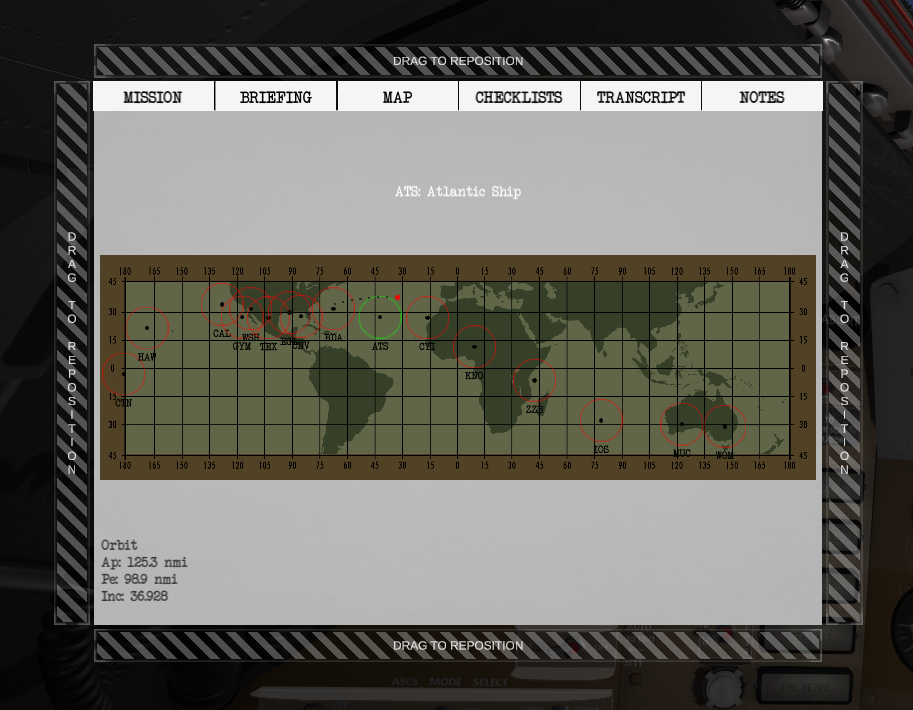


To avoid clutter, they will all be visible for the first second after opening the mission pad before fading out. Each zone will become visible if you move the mouse into its zone. Click and Drag on any of these zones to grab the Mission Pad and move it around. This system as been added to Mercury, Gemini and Apollo.
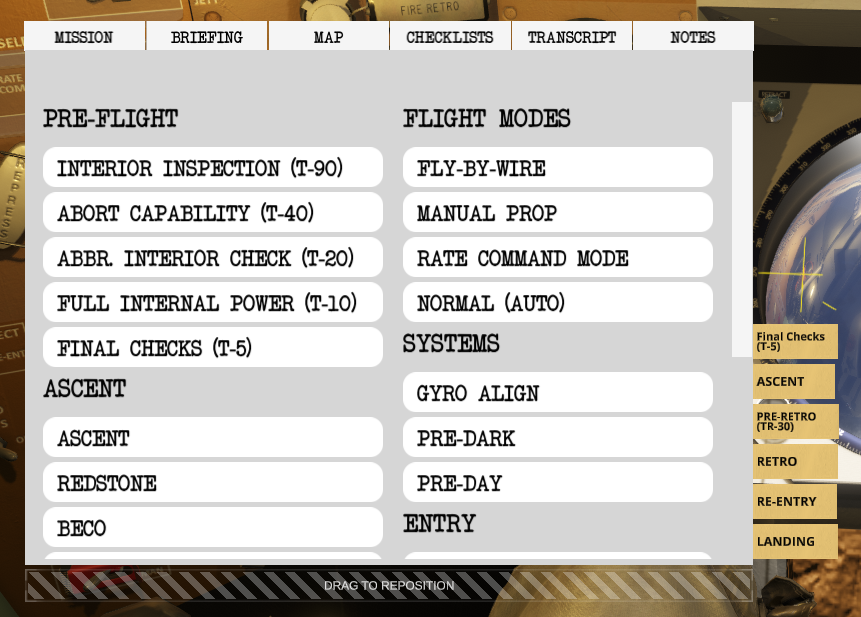


Mercury Cockpit improvements

One frequent bug report I get is that some sequencer lights does not illuminate correctly. This is because not all sequencer blocks contains a light. I made a re-model of those to better communicate this, and improve the model towards a more realistic visualization of what they actually looked like.
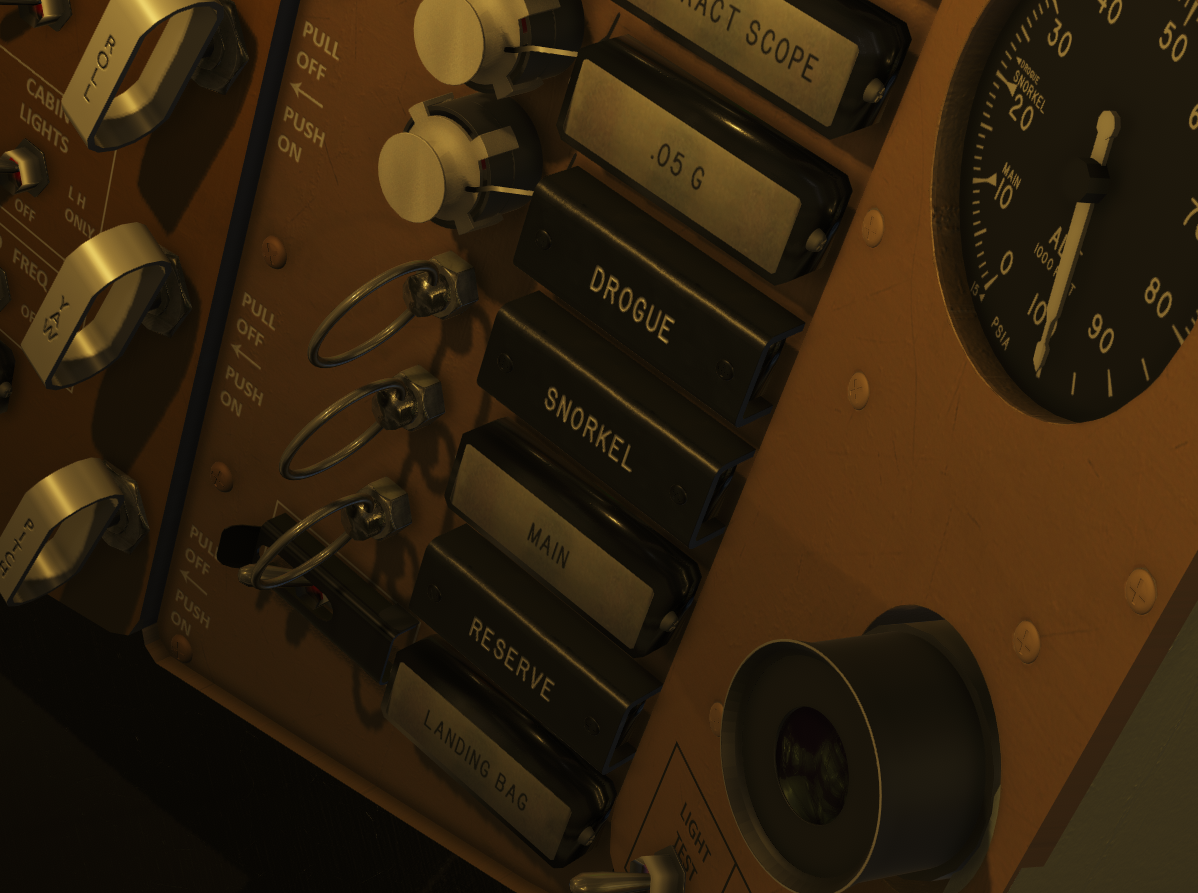


In addition I updated all the Mercury Gauges to look more like what they did in real life. They should all behave like you are used to but with slightly updated textures and models.
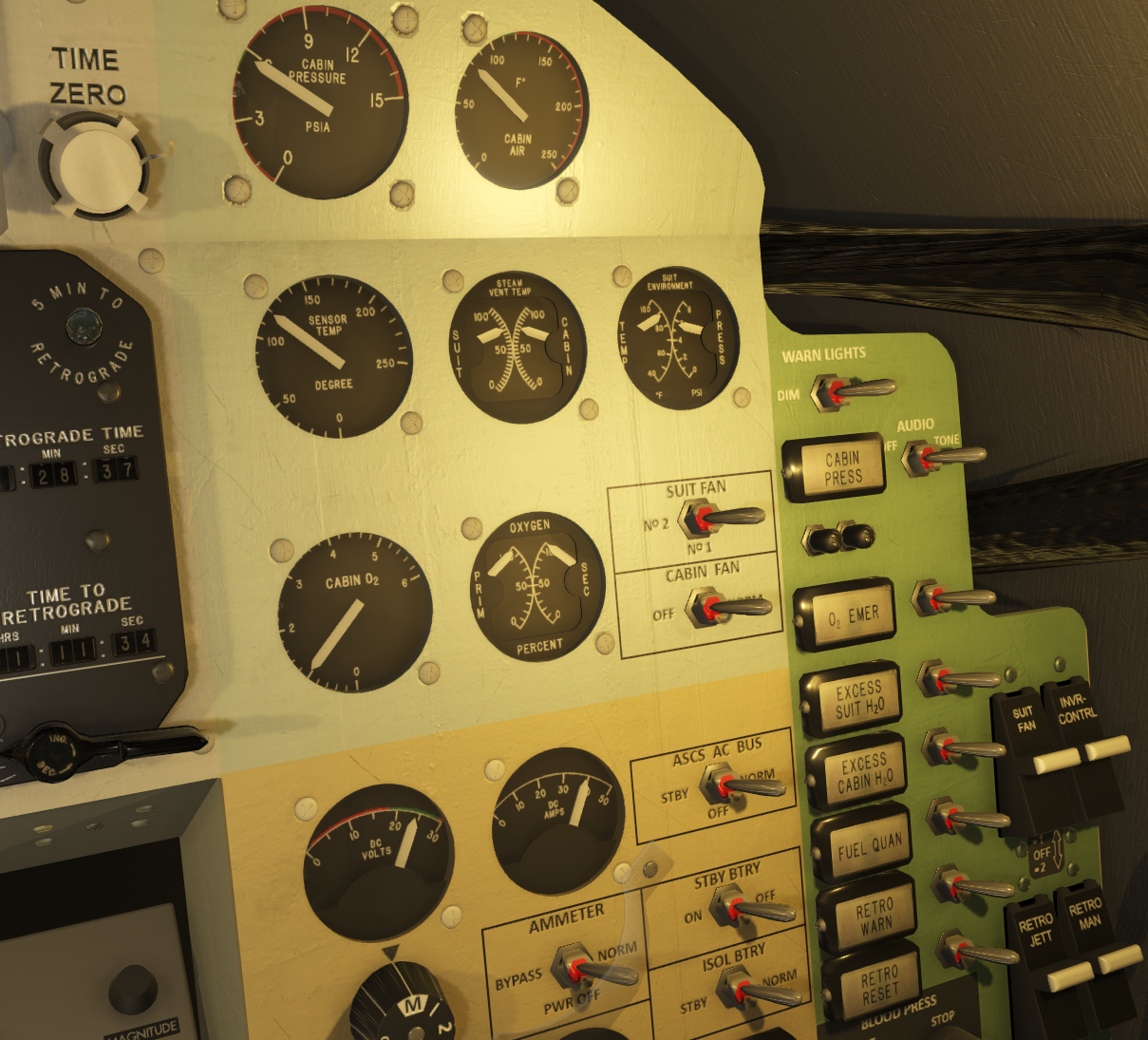
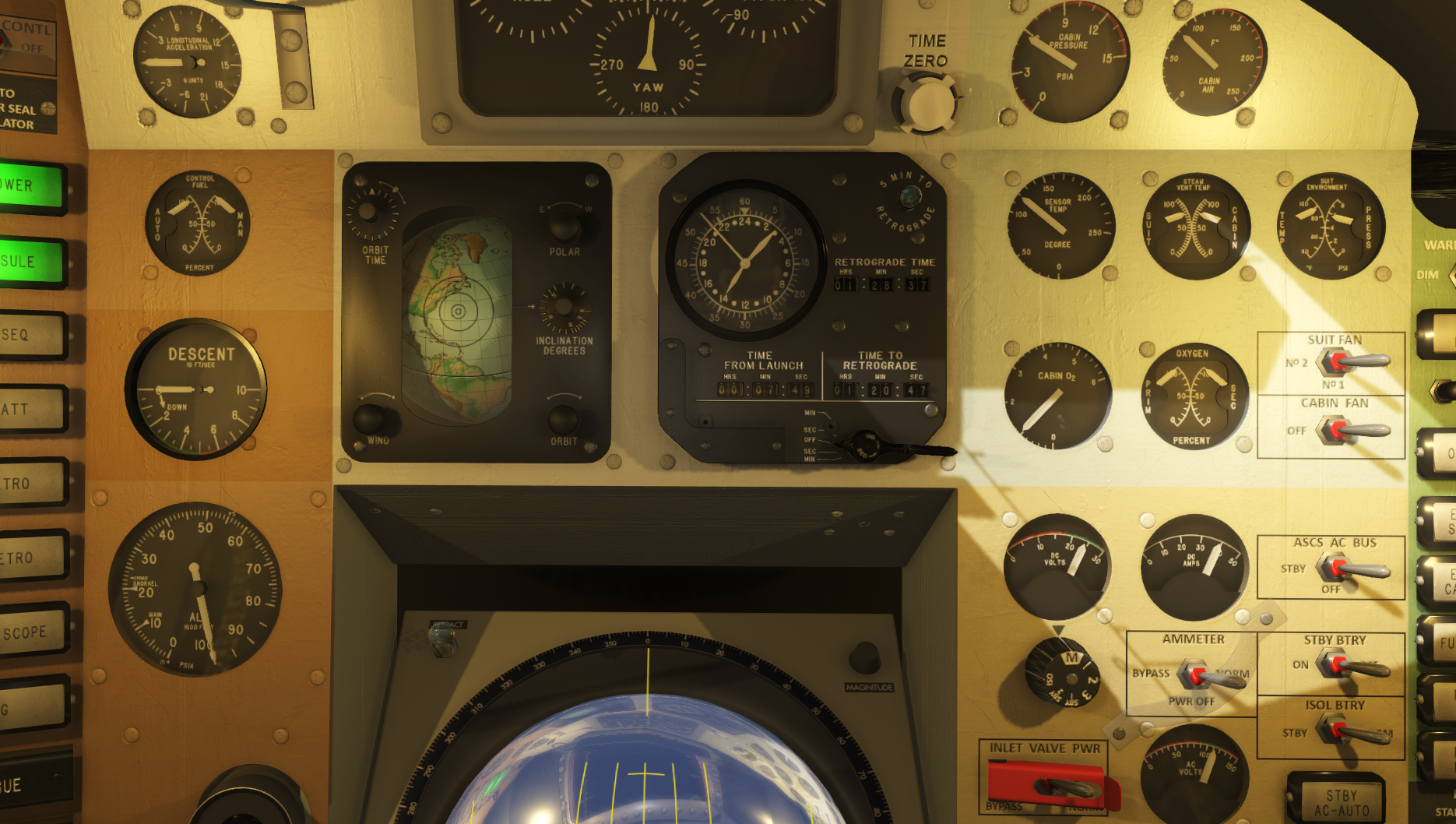


Failures added to the Mission Debrief Timeline

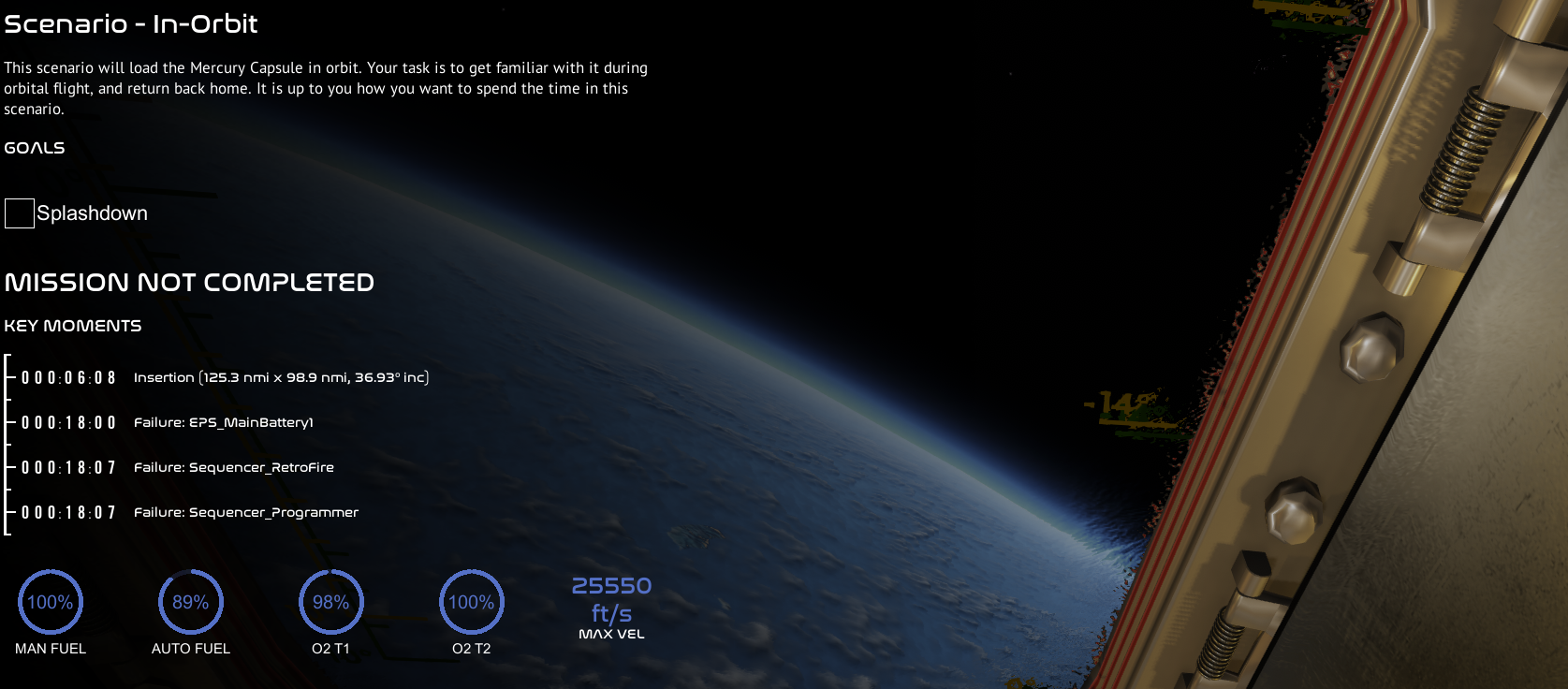
I added a Key Moment for each failure to the mission debrief timeline to better help you analyze and understand what you had to deal with in a mission, when having random failures enabled.


Right Clicking a Push Button

I added support for right clicking a push button. It will basically just be handled in the same way as a left click. Previously an issue triggered the button push animation but not the logic when pressing it with the right button. This will hopefully help with some of the confusion, especially in VR.


Lunar Module Powered Descent (PDI) request changes

I have improved how the REQUEST PDI logic works. This changes the procedure on requesting the PDI burn compared to previously and Ground will communicate the instructions to you.

Previously, when pressing REQUEST PDI, the inertial platform stored in the IMU would automatically be updated to the required orientation for powered descent. It did this by slowly adjusting it until the landing calculation was complete. This logic caused slight confusion, and was the only place left where the inertial platform would "magically just change".

Going forward, you still need to press REQUEST PDI. Ground will let you know that they are working on the parameters. A few moments later (up to 60 seconds), they will uplink the parameters as before, along with the required orientation (stored in preferred). You will then need to use P52 option 1 in the LM to torque the platform to the new orientation (like you are used to during all other burns).


GET/MET rendering in UI date/time section

Improved the date/time section to contain both the local/UTC time and the current mission time (Ground Elapsed Time (GET)) after liftoff.
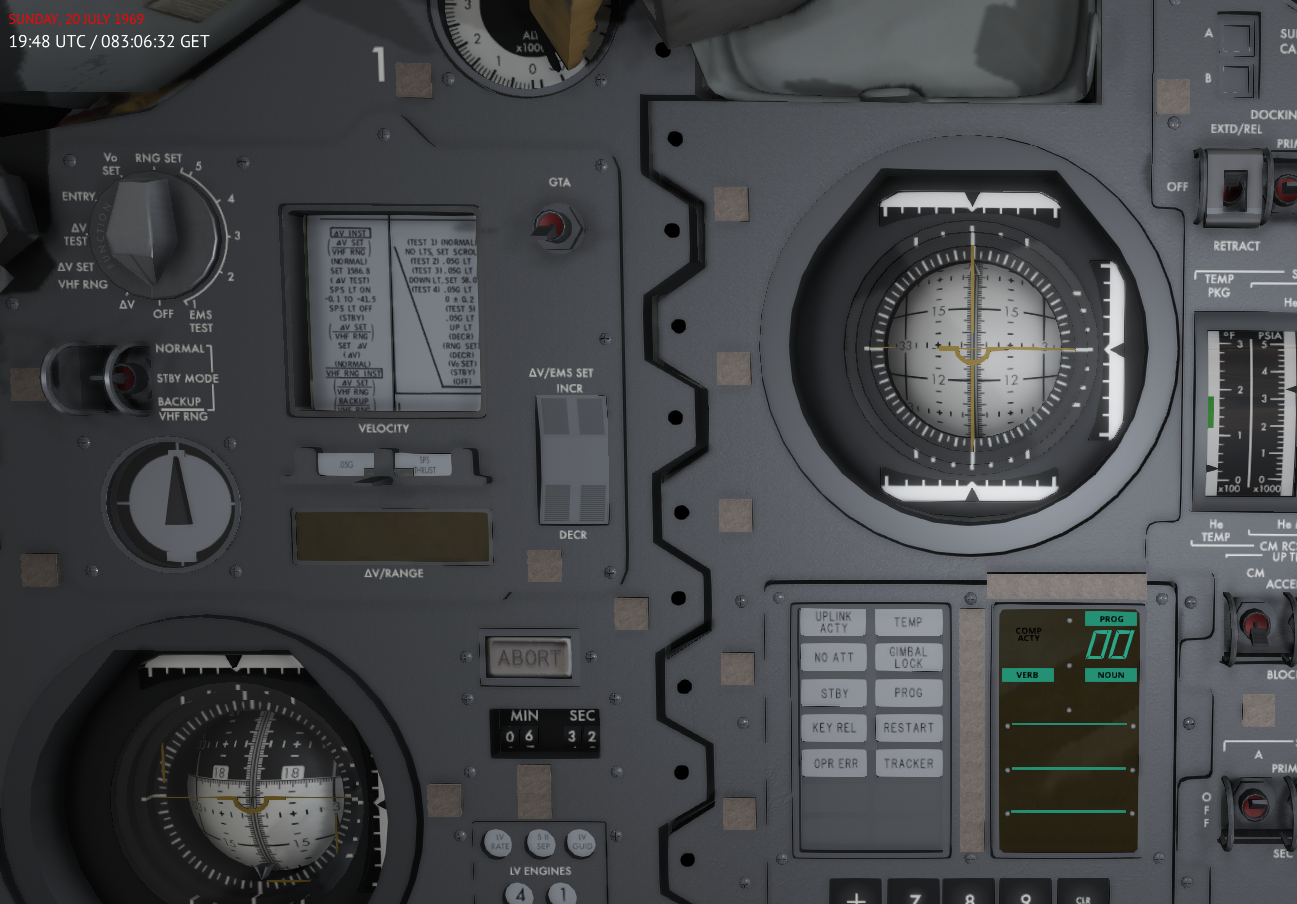


Note: If you want to declutter the screen or be more dependent on the internal mission timer, you can always toggle this section completely off using the bindable hot keys on the Input configuration.



Toggle Crew Models

I added a hot key to toggle the crew models manually.



Previously you could enable or disable the crew models from the Main Menu -> Settings. With the new hot key, you can override this setting to manually toggle them on or off. When enabled, their normal detection (hide/show) logic is on.


VR Hand Menu

I have started to implement a simple VR Hand Menu that can be used to toggle the Mission Pad, the Current Objective menu and trigger an Abort. More features can be added to this menu as needed.
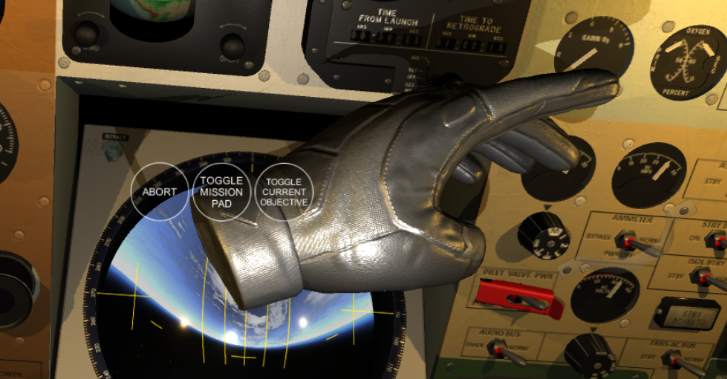


Patch notes:

  - Checklist fixes and updates

  - Added additional Drag Zones to the Mission Pad to make it easier to drag it around the screen/reposition it

  - Failures added as a debrief moment so you can analyze why things happened

  - Fixed: Right Clicking a push button will press the button but not trigger the function

  - Request PDI changes

  - TEI planner stability fix

  - Stop EVA breathing SFX after EVA

  - Improvements to the Gemini CO2 scrubbing system

  - Added a default key bind for SLOW MODE timescale (CTRL+SHIFT+F1)

  - Added the CM GPI and CM SYS Test Voltmeter gauges to integral light power circuit

  - Main Menu UI Hard lock Bug (Contribute conflicts with Developer Message)

  - Gemini EVA orientation reset for each egress

  - Fixed the LM He Supercritical venting logic

  - Fixes to the UI Scaler

  - Realism improvements to the Mercury cockpit gauges and monitoring instruments

  - Fixes to the Mercury Sequencer model

  - Added a setting to automatically skip the cinematic intro cutscene

  - Made a hotkey (bound in Input Config) to toggle the Crew Models on or off during gameplay

  - Made a feature on the gauges to control their interpolation direction to avoid needles taking rotating the wrong direction to reach its target

  - Clicking the Checklist tab in the Mission Pad will take you back to the Checklist selection (back) (thanks Nepzukka)

  - Fixed an issue where the OAMS/RCS shutoff valve would play the sfx if trying to maneuver while the system is off

  - S-IVB plume not stopping after TLI burn fix

  - Corrected the Phi symbol on the CM AC voltmeter

  - Flickering cockpit cursor fix

  - Removed the Photo Camera button in Apollo

  - GET/MET rendering in UI date/time section

  - Fixed an issue that could automatically scroll the Mission Debrief screen upwards for some players

  - VR: Added a way to trigger Abort

  - VR: Added a VR Hand Menu

*Update: meta fix for lm camera

Happy New Year 2026!

-Petri W.

funny
0
informative
0
Thanks
0
No reactions
No reactions
No reactions

I stand against Racism, Bigotry and Bullying

Offline Asid

  • HAVOC
  • *
  • Posts: 27461
Re: Reentry - An Orbital Simulator
« Reply #145 on: January 13, 2026, 12:02:39 AM »
Reentry has been updated to 1.0.30 - Checklist search, Academy fixes, Systems
Mon, 12 January 2026


This update adds a search feature to the Mission Pad -> Checklists page, rolls out a full overhaul of the CM Academy lesson 8 (SPS burn planning) and CM Academy lesson 9 A (Atmospheric Entry). It also fixes and improves many internal systems in the Apollo Command Module, fixes quite a few of internal and reported VR issues and general bug fixes.

As mentioned during the 1.0 release, the current phase of development has been mainly focused on fixing zero-day issues, crash to desktop issues, stability, Quality-of-Life fixes and in-game content (academy, missions, checklists, language) based on feedback from you who play the game.

I want to thank you all for helping me improve the game to the best of my ability, and for being part of shaping this product. At this point, these types of reports are slowing down a bit. I will continue to remain in this phase for a few more patches before shifting gears towards the 1.1 bits. Check the in-game Roadmap for details about all of this.

Note: If this patch causes new issues for you, please report them. You can always revert back to a previous version using the Steam Betas tab for the game. The latest previous version is: 1.


Checklist Search

A text field is added to the checklist page that provides search capabilities on the checklist names. Typing anything into this field will filter the checklists in the Mission Pad, and clearing it will revert the results back to normal. Use this to quickly find the checklists you need.


Read on...
funny
0
informative
0
Thanks
0
No reactions
No reactions
No reactions

I stand against Racism, Bigotry and Bullying

Tags:
     

    Ship Simulator Extremes

    Started by Don_prince

    Replies: 1
    Views: 20971
    Last post December 15, 2015, 12:23:50 AM
    by Asid
    Spearhead 2 : M1A2 Abrams tank simulator

    Started by Asid

    Replies: 0
    Views: 11478
    Last post June 14, 2025, 01:50:02 AM
    by Asid
    JRP tours Plane Mechanic Simulator (late alpha release)

    Started by JasonPratt

    Replies: 0
    Views: 13570
    Last post May 26, 2019, 09:19:24 PM
    by JasonPratt
    First Aerosoft Farm Simulator 17 Add-on announced!

    Started by Asid

    Replies: 0
    Views: 15715
    Last post June 22, 2017, 03:00:31 PM
    by Asid
    American Truck Simulator

    Started by Asid

    Replies: 0
    Views: 16639
    Last post May 26, 2016, 03:22:10 AM
    by Asid