- Welcome to Dogs Of War Vu.

Cry Havoc! And let slip the dogs of war!

IL-2 Dev blog #231
20.09.2019
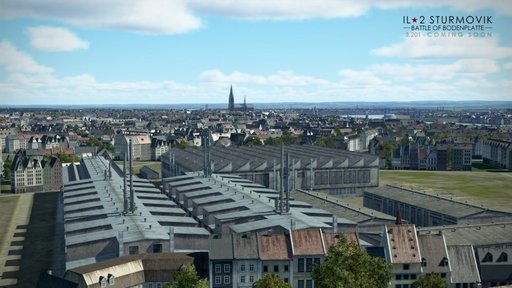
We're in the second half of September and this means that the next update 3.201 isn't far away. This one will be massive and will bring a lot of new content as well. Three player controllable aircraft, AI bomber, new AI ground vehicles and of course, the new map - Rheinland. This map tops the records once again: 130 000 square kilometers of reachable terrain (401 x 324 km), 176 000 square kilometers total size (461 x 384 km), 225 cities and towns - a record number of big cities, 70 airfields - 67 of them have historically correct layout recreated using archive documents. For increased detail and historical accuracy, for the first time, we have used 4 airfield types on the same map - with concrete, metal, and unpaved runways and airstrips without runways.


To populate the map with European buildings on such a large scale new 'construction kit' of European city blocks was created - this allowed to represent highly populated cities while keeping the general layout of the city where they belong. There are new models for big factories and many unique buildings and we also actively used the bridges 'construction kit' which has been developed previously.


Landscape...
20.09.2019
We're in the second half of September and this means that the next update 3.201 isn't far away. This one will be massive and will bring a lot of new content as well. Three player controllable aircraft, AI bomber, new AI ground vehicles and of course, the new map - Rheinland. This map tops the records once again: 130 000 square kilometers of reachable terrain (401 x 324 km), 176 000 square kilometers total size (461 x 384 km), 225 cities and towns - a record number of big cities, 70 airfields - 67 of them have historically correct layout recreated using archive documents. For increased detail and historical accuracy, for the first time, we have used 4 airfield types on the same map - with concrete, metal, and unpaved runways and airstrips without runways.
To populate the map with European buildings on such a large scale new 'construction kit' of European city blocks was created - this allowed to represent highly populated cities while keeping the general layout of the city where they belong. There are new models for big factories and many unique buildings and we also actively used the bridges 'construction kit' which has been developed previously.
Landscape...

Tacview 1.8.1 beta 1 is available Now
Download: HERE
• Release Date: Fri, 20 Sep 2019
• Operating System: Windows® 32-bit / 64-bit
• File Size: 293.3 MB
Release notes
FEATURES & CHANGES
• Beta 1: ADDED support for DCS: Fw 190 A-8
• Beta 1: ADDED mode aircraft 3D models
FIXES
Dev News #173
Fri, 20 September 2019
Hello, Feudalists!
It took a bit longer than we expected with the update that we have released just recently, but our hard work have yielded desired results. Yesterday's fixes covered some more and less critical issues. Most important problem that we have dealt with were recent server stability issues. They should operate more smoothly now. Do not hesitate to let us know if you face any problems.
We have also fixed the annoyance with splitting item stacks, which forced you to press Enter each time you used manual input to specify amount of items to split from the stack.
Another notable change was adding Manage Object Rights and Rename ability to the post-0.2.0 update buildings - Check the details in our patch notes. You can now configure their permissions same as other buildings on your claim.
Among other improvements and fixes, there's one last thing we want to mention - a requested Healer's Standard skin for your Personal War Banners which will properly indicate presence of a healer on the battlefield.
You can, as always, expect more tweaks, fixes and improvements coming your way in the upcoming updates. Remember, we keep our eyes and ears out for your...
Fri, 20 September 2019
Hello, Feudalists!
It took a bit longer than we expected with the update that we have released just recently, but our hard work have yielded desired results. Yesterday's fixes covered some more and less critical issues. Most important problem that we have dealt with were recent server stability issues. They should operate more smoothly now. Do not hesitate to let us know if you face any problems.
We have also fixed the annoyance with splitting item stacks, which forced you to press Enter each time you used manual input to specify amount of items to split from the stack.
Another notable change was adding Manage Object Rights and Rename ability to the post-0.2.0 update buildings - Check the details in our patch notes. You can now configure their permissions same as other buildings on your claim.
Among other improvements and fixes, there's one last thing we want to mention - a requested Healer's Standard skin for your Personal War Banners which will properly indicate presence of a healer on the battlefield.
You can, as always, expect more tweaks, fixes and improvements coming your way in the upcoming updates. Remember, we keep our eyes and ears out for your...

What's your gaming pleasure this weekend? 20/09/19

Work/real life stuff ongoing...Good weather this weekend so hopefully RC flying with electric helos. Maybe fix the servo issue on my plane...A nose in impact from 30 feet didn't help.....

Military flight sim in P3DV4
Vietnam/SE-Asia missions. Yep, thats right and they fight back

I use: FSX@War, CCP, FSCAI, VACMI (SSW)
There is a new release of FSCAI which makes the enemy ai come alive! here . FSCAI is coming on very nicely. I will use it with the trusty FSX@War
Military simulation is VERY doable in P3D. I enjoy having the entire world to fly in as well as real weather. I can fly a mission in Syria, Libya, Afghanistan, Vietnam. In fact almost anywhere.
Planes I will use:
- Milviz F100D
- Milviz FG-1D Corsair
- F84F THUNDERSTREAK by SimSkunk Works
- Mirage IIIC by Resterauvia
- VRS Superbug F/18E
- JustFlight Avro Vulcan
Histwar: closed Beta

If I get time maybe:
- Command: Modern Operations
- Gloomhaven
-Tank simulation
That's what I am trying to play.

...